WE ARE HIRING • WE ARE HIRING • 
Certified Flutter Consultants|RevenueCat Technical Partners|4.9★ Rated on Clutch|Top Rated Plus · Upwork|250+ Projects Delivered|200+ Happy Clients Worldwide|Delivering Excellence Since 2019|The Expertise Behind Every Product We Build|Helping Businesses Across Industries Innovate|Voices of the Companies We’ve Helped|
Home/Blogs/Rating and Feedback Collector
flutterMay 8, 2025

Rating and Feedback Collector

Introduction User feedback collection cannot be overemphasized, therefore, if an app is to grow in both quality and satisfaction, The package offers a developer versatile solutions into making bars rated with icons, emojis, and even custom images. Further, this allows dynamic feedback alerts, hence allowing the user to include as much detail in their feedback […]

Jay Leshwala

Flutter

Rating and Feedback Collector

Introduction

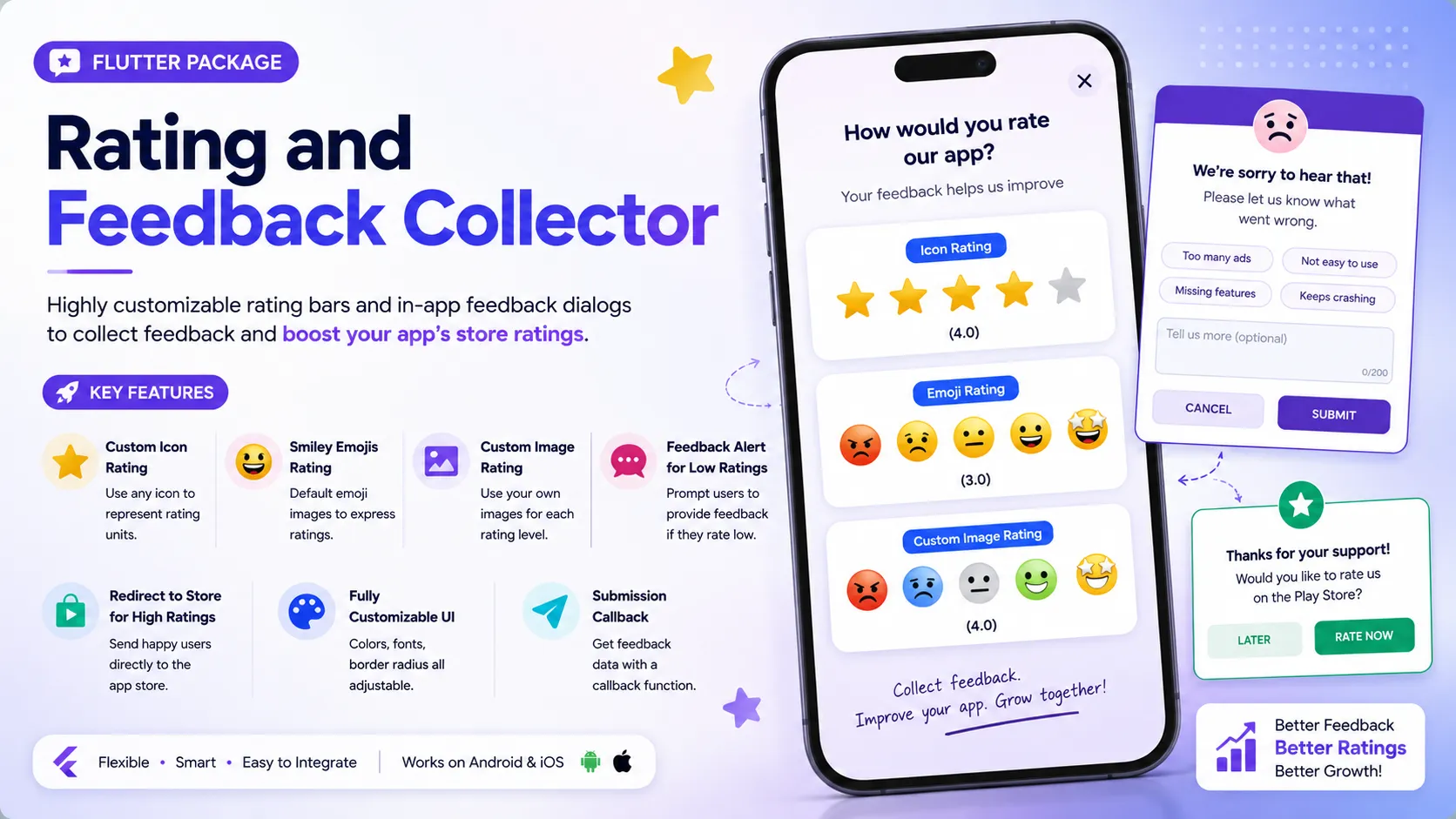
User feedback collection cannot be overemphasized, therefore, if an app is to grow in both quality and satisfaction, The package offers a developer versatile solutions into making bars rated with icons, emojis, and even custom images. Further, this allows dynamic feedback alerts, hence allowing the user to include as much detail in their feedback as possible and rate your app. This will walk you through the setup and usage of this package, hence you can make full use of its features.

Key Features

  • Custom Icon Rating: Use any icon to represent rating units.
  • Smiley Emojis Rating: Default emoji images to express ratings.
  • Custom Image Rating: Use your custom images for ratings.
  • Feedback Alert Box for Low Ratings: Prompt users to provide feedback if they rate low.
  • Redirect to Store for High Ratings: Redirect users to the app store for a review if they rate high.
  • Customizable UI & Contents: Fully customizable to fit your app’s theme.
  • Submission Callback: Get feedback data with a callback function.

Installation

First, add the rating_and_feedback_collector package to your pubspec.yaml file:

dependencies:
rating_and_feedback_collector: ^0.0.2

Then, run pub get to fetch the package.
Importing the Package
Next, import the package into your Dart file:

import 'package:rating_and_feedback_collector/rating_and_feedback_collector.dart';

Usage

Here are examples of how to use the package’s main features:

Rating Bar with Icons

The RatingBar widget allows you to use icons to represent ratings. You can customize the icons, their size, colors, and whether half ratings are allowed.

double _rating = 0.0;
RatingBar(
iconSize: 40, // Size of the rating icons
allowHalfRating: true, // Allows selection of half ratings
filledIcon: Icons.star, // Icon for a filled rating unit
halfFilledIcon: Icons.star_half, // Icon for a half-filled rating unit
emptyIcon: Icons.star_border, // Icon for an empty rating unit
filledColor: Colors.amber, // Color of filled rating units
emptyColor: Colors.grey, // Color of empty rating units
currentRating: _rating, // Set initial rating value
onRatingChanged: (rating) { // Callback triggered when the rating is changed
setState(() { _rating = rating; });
},
),

Rating Bar with Emoji Images

The RatingBarEmoji widget uses default emoji images to represent ratings.

double _rating = 0.0;
RatingBarEmoji(
imageSize: 45, // Size of image in the rating bar
currentRating: _rating, // Set initial rating value
onRatingChanged: (rating) { // Callback triggered when the rating is changed
setState(() { _rating = rating; });
},
),

Rating Bar with Custom Images

The RatingBarCustomImage widget allows you to use custom images for different rating levels.

double _rating = 0.0;
RatingBarCustomImage(
imageSize: 45, // Size of image in the rating bar
currentRating: _rating, // Set initial rating value
activeImages: const [
AssetImage('assets/Images/ic_angry.png'),
AssetImage('assets/Images/ic_sad.png'),
AssetImage('assets/Images/ic_neutral.png'),
AssetImage('assets/Images/ic_happy.png'),
AssetImage('assets/Images/ic_excellent.png'),
],
deActiveImages: const [
AssetImage('assets/Images/ic_angryDisable.png'),
AssetImage('assets/Images/ic_sadDisable.png'),
AssetImage('assets/Images/ic_neutralDisable.png'),
AssetImage('assets/Images/ic_happyDisable.png'),
AssetImage('assets/Images/ic_excellentDisable.png'),
],
onRatingChanged: (rating) { // Callback triggered when the rating is changed
setState(() { _rating = rating; });
},
),

Customization Properties

The package offers various properties to customize the rating bar and feedback dialog:

  • currentRating (double): Set initial rating value
  • filledIcon (only for RatingBar) (IconData?): Icon for a filled rating unit
  • halfFilledIcon (only for RatingBar) (IconData?): Icon for a half-filled rating unit
  • emptyIcon (only for RatingBar) (IconData?): Icon for an empty rating unit
  • filledColor (only for RatingBar) (Color?): Color of filled rating units
  • emptyColor (only for RatingBar) (Color?): Color of empty rating units
  • iconSize (double?): Size of the rating icons
  • onRatingChanged (Function(double)): Callback triggered when the rating is changed
  • allowHalfRating (only for RatingBar) (bool?): Allows selection of half ratings
  • isGoogleFont (bool?): Set to true for using Google fonts
  • fontFamilyName (String?): Custom font family name or Google font family name
  • showFeedbackForRatingsLessThan (double?): Threshold rating value below which feedback box is shown
  • feedbackBoxTitle (String?): Title for the feedback box
  • lowRatingFeedbackTitle (String?): Title for feedback options in the low rating feedback box
  • lowRatingFeedback (List<String>?): List of feedback strings for low ratings
  • showDescriptionInput (bool?): Option to show input box for user descriptions in the feedback dialog
  • descriptionTitle (String?): Title for the description input box in the feedback dialog
  • descriptionPlaceHolder (String?): Placeholder text for the description input box
  • descriptionCharacterLimit (int?): Character limit for the description input
  • submitButtonTitle (String?): Title for the submit button in the feedback dialog
  • onSubmitTap (Function(selectedFeedback, description)): Callback function triggered on submission of feedback
  • showRedirectToStoreForRatingsGreaterThan (double?): Threshold rating value above which the app redirects to the store for a review
  • androidPackageName (String?): Android package name for the app, used in the store redirect
  • iosBundleId (String?): iOS bundle ID for the app, used in the store redirect
  • innerWidgetsBorderRadius (double?): Border radius for the feedback dialog widgets
  • alertDialogBorderRadius (double?): Border radius for the feedback dialog

Conclusion

Rating_and_feedback_collector Package is the optimal solution for adding highly flexible rating bars and in-app feedback alerts into your Flutter app.
By incorporating this package you can raise user’s interest, collect useful feedback and eventually boost your app’s ratings in the store. Include this package into your app and enjoy its flexible and user-friendly elements.

Keep Reading
Related Articles

You Might Also Like

Effortless Dart Coding with dart_extensions_pro
flutterMay 8, 2025

Effortless Dart Coding with dart_extensions_pro

Introduction Introducing dart_extensions_pro a Dart package that offers a collection of handy extensions and helper functions designed to enhance the development process. By simplifying common tasks and providing streamlined solutions, it allows developers to write code more efficiently and focus on building features rather than repetitive tasks. Ideal for improving productivity, this package is a valuable tool […]

Read more
Struggling with Icloud Data Sync Issues? Let iCloud_Storage_Sync Handle It!
flutterMay 8, 2025

Struggling with Icloud Data Sync Issues? Let iCloud_Storage_Sync Handle It!

In the ever-evolving world of mobile app development, providing a seamless user experience across multiple devices is no longer a luxury — it’s a necessity. Enter the iCloud_Storage_Sync plugin, a game-changing solution for Flutter developers looking to harness the power of iCloud in their iOS applications. This comprehensive guide will walk you through everything you […]

Read more
Struggling with Twilio Voice Call Integration in Flutter? twilio_voice_flutter Solves It!
flutterMay 8, 2025

Struggling with Twilio Voice Call Integration in Flutter? twilio_voice_flutter Solves It!

The twilio_voice_flutter plugin simplifies integration with Twilio’s Programmable Voice SDK, enabling VoIP calling within your Flutter apps. It supports both iOS and Android, offering an easy-to-use API for managing calls. Ideal for customer service, communication, or any app needing real-time voice, it leverages Twilio’s reliable infrastructure to deliver high-quality VoIP features. Getting started Add dependency […]

Read more
Flutter Plugin vs Flutter Package: What’s the Difference?
flutterMay 8, 2025

Flutter Plugin vs Flutter Package: What’s the Difference?

As Flutter developers, we often use the terms plugin and package interchangeably. However, they are not the same thing. Understanding the distinction between the two is important when developing or choosing the right tool for your app. In this article, we’ll explore the key differences, use cases, and when to choose one over the other. […]

Read more